~/lab — proof of work
The Lab
Client work ships to private repositories, so instead of pointing you at an empty GitHub profile, this page walks through three systems I built and run — with the architecture decisions and the actual source code.
The first exhibit is open in your browser right now.
lab/01 · portfolio.tsx
This site is the first exhibit
Everything around this text — the file explorer, the tab bar, the panels, the terminal — is a hand-built VS Code replica, not a template. The tab that opened when you navigated here is React state synced to the router, and it closes like the real editor: focus hands off to the previous file.
- →Routes are files: visiting any URL opens its tab, driven by one context that keeps router and editor state in sync
- →A working terminal with 14 commands, Tab autocomplete, command history, and hidden easter eggs
- →Five editor themes (dracula, monokai, github…) applied by an inline script before first paint — no flash on reload
- →Server-rendered pages with per-route metadata, structured data, and an llms.txt for AI crawlers
The terminal is real — toggle it from the status bar at the bottom of this page.
useEffect(() => {setActiveTab(pathname);// Navigating to a known file that isn't open yet opens its tab,// like opening a file in VS Code (e.g. the /services pages).const known = allIdeFiles.find(file => file.path === pathname);if (known) {setOpenTabs(prev =>prev.some(tab => tab.path === known.path)? prev: [...prev, { name: known.name, path: known.path }]);}}, [pathname]);
- Next.js 15
- React 18
- TypeScript
- Tailwind CSS
- Framer Motion
lab/02 · webos.tsx
A Windows 98 operating system for the browser
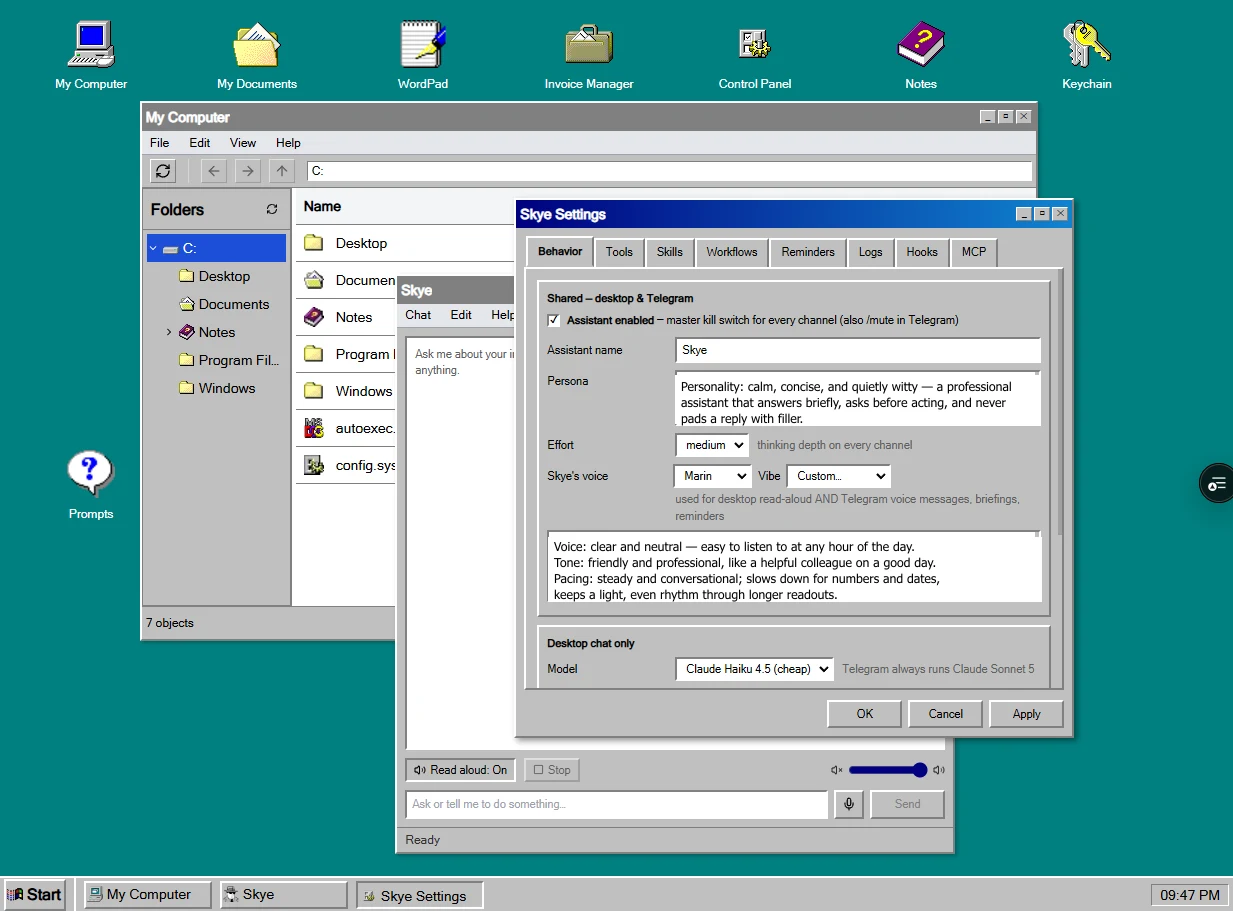
My personal dashboard is a full web OS: draggable, resizable windows with z-order management, a taskbar and start menu, and a virtual filesystem stored in MongoDB. Each internal tool is a “program” — invoicing, markdown notes, an encrypted credential keychain, a prompt library. Skye lives here too, one window among the others.
- →Window manager in Zustand with persisted layout — closing a window hands focus to the highest z-index survivor
- →Virtual filesystem as a parent–child tree in MongoDB (Prisma), unique per user and path
- →NextAuth with JWT sessions, bcrypt passwords, and email verification
- →Keychain program encrypts credentials with AES-256-GCM at rest, behind a PIN auto-lock
- →Installable PWA with a separate mobile OS mode
closeWindow: id => {set(state => {const remainingWindows = state.windows.filter(w => w.id !== id);// Find the next active window (highest z-index that's not minimized)let nextActiveId = null;if (state.activeWindowId === id && remainingWindows.length > 0) {const visibleWindows = remainingWindows.filter(w => !w.isMinimized);if (visibleWindows.length > 0) {nextActiveId = visibleWindows.reduce((prev, current) =>prev.zIndex > current.zIndex ? prev : current).id;}}// …return { windows: remainingWindows, activeWindowId: nextActiveId };});publishAppEvent('window:close', { id });},
- Next.js 15.2
- React 19
- Zustand
- Prisma
- MongoDB
- NextAuth
- PWA
lab/03 · skye.ts
Skye — an AI assistant with hands, not just words
Skye is a Claude-powered agent that operates the web OS and lives on Telegram — one shared agent loop serves both channels. It has 34 tools across nine groups: invoices, notes, files, prompts, Google Calendar, Gmail, reminders, and UI control. Reads run freely; risky actions stop and ask.
- →Write-approval protocol: the loop pauses mid-turn, returns the pending writes, and resumes with the owner's approve/decline decisions
- →Channel-aware permissions — credential tools never reach remote channels, and Gmail is read-only at the OAuth-scope level
- →Prompt-injection aware: email content is treated as untrusted data, never as instructions
- →Every tool call and turn lands in an audit log; reminders and morning briefings arrive via cron
- →Voice input and output on the desktop channel
⏸ saveReminder — needs your approval
“Chase Acme invoice #0038” · tomorrow 09:00
✓ Approve✕ Decline// Returns `confirm` with the authoritative messages + pending writes when a// gated write needs owner approval — the caller persists/carries `messages`// and re-enters with `decision`.export type RunAgentTurnResult =| { status: 'done'; messages: Anthropic.MessageParam[]; finalText: string }| { status: 'confirm'; messages: Anthropic.MessageParam[]; pending: PendingWrite[] }| { status: 'error'; messages: Anthropic.MessageParam[]; message: string };
- Claude API
- Anthropic SDK
- TypeScript
- Telegram Bot API
- Google APIs
- Prisma
- cron
The same care, on your project
The write-approval and audit patterns behind Skye are how I build AI assistants for businesses.
AI integration servicesThe auth, encryption, and data-model discipline of the web OS is the baseline for client dashboards and ERPs.
Web development servicesAnd this site is one of 150+ delivered projects — the rest are in the showcase.
Browse projects